There is a specific kind of frustration that every service business knows well. A customer sends a message asking to book. Someone on your team sees it an hour later, checks the calendar, replies with available slots, and waits. The customer comes back the next morning. Your team confirms. The customer asks if a different time works. The back-and-forth stretches across a day and a half, and by the end of it, your team has spent twenty minutes arranging a thirty-minute appointment.
Multiply that across fifty bookings a week and you start to see the operational cost of manual scheduling. Not just in time, but in dropped conversations, missed follow-ups, and the inevitable no-shows from customers whose confirmations never felt solid enough to commit to.
WhatsApp is now where most of your customers already are. Over three billion people use the platform monthly, and appointment booking through WhatsApp has been adopted by half of all users who interact with businesses on the platform. The infrastructure for automating this process has matured significantly. What used to require a development team and months of integration work can now be configured, tested, and live within days. This shift is also pushing businesses to work more closely with a technology consulting company to streamline customer communication, workflow automation, and system integration strategies.
This guide covers how businesses are actually doing it: the mechanics of WhatsApp appointment automation, where it works best, which industries are seeing the biggest returns, and how to build a setup that runs reliably without constant manual oversight.
Why WhatsApp Works Differently for Scheduling
Before getting into the mechanics, it is worth understanding why WhatsApp performs so differently from other booking channels.
Email appointment confirmations average a 21 percent open rate. WhatsApp messages sit consistently between 90 and 98 percent. That gap alone changes the economics of appointment reminders, because a reminder that does not get read cannot prevent a no-show. Businesses using WhatsApp reminders have reported no-show reductions of up to 52 percent compared to email-based confirmation systems.
The other difference is response time. Confirmation responses via WhatsApp arrive 3.2 times faster on average than email-based confirmations. In scheduling terms, that means less calendar ambiguity, fewer double-bookings held in limbo, and a significantly faster booking cycle from first contact to confirmed slot.
There is also a behavioural element that statistics cannot fully capture. WhatsApp feels personal. It is the same channel people use to message their friends, family, and colleagues. When a business communicates through it professionally and thoughtfully, the interaction carries a warmth that a booking portal confirmation email simply cannot replicate. That perception translates into higher completion rates: WhatsApp bookings close at 40 percent higher rates than traditional web forms.
Businesses that add WhatsApp as a booking channel report, on average, 27 percent more revenue, 35 percent higher customer retention, and 45 percent more repeat bookings. The average additional monthly revenue attributed to WhatsApp bookings sits around $1,500 per business, and that figure scales significantly for higher-ticket service providers.
The Building Blocks of WhatsApp Appointment Automation
Understanding how automated WhatsApp scheduling works starts with the underlying infrastructure. The WhatsApp Business API is the layer that enables businesses to send and receive messages programmatically, integrate with external systems, and build automated workflows on top of the platform.
The API itself does not come with a scheduling interface. It is a communication layer. What transforms it into an appointment booking system is the workflow builder sitting on top of it, which connects customer messages, calendar availability, CRM data, and confirmation logic into a coordinated automated process.
A properly built WhatsApp appointment automation system has five core components working together.
A booking trigger. This is what starts the conversation. It might be a customer sending a keyword like “Book” or “Appointment,” clicking a WhatsApp link on your website, scanning a QR code at your reception, or responding to a proactive campaign message. The trigger is the entry point into the automated flow.
An availability layer. The automation needs to know what slots are open. This means a live connection to your calendar system, whether that is Google Calendar, Outlook, a clinic management platform, a salon booking system, or any other scheduling tool with API access. Without this connection, the automation cannot show real-time availability, and any slot it suggests might already be taken.
Conversational flow logic. This is the sequence of messages that guides the customer from expressing intent to confirming a booking. It collects required information such as the nature of the appointment, preferred date and time, and any specific requirements, then presents available slots in a format the customer can respond to without friction. Well-designed flows use WhatsApp’s interactive message features including list pickers and quick reply buttons, so customers make selections rather than typing freeform text that the system then has to interpret.
Confirmation and reminder sequences. Once a booking is made, the automation sends an immediate confirmation with all relevant details. It then fires a series of reminders at defined intervals before the appointment. For most service businesses, a reminder 24 hours before and another two hours before strikes the right balance between helpful and intrusive. These sequences run without any manual intervention.
CRM and data sync. Every booking, rescheduling, cancellation, and no-show feeds back into your customer records. This is what makes the data valuable beyond the individual appointment. It tells you which customers are repeat bookers, which ones consistently cancel last minute, which time slots fill fastest, and which team members or service types generate the most demand.
How the Booking Flow Actually Works
Walking through a real booking interaction makes the mechanics concrete.
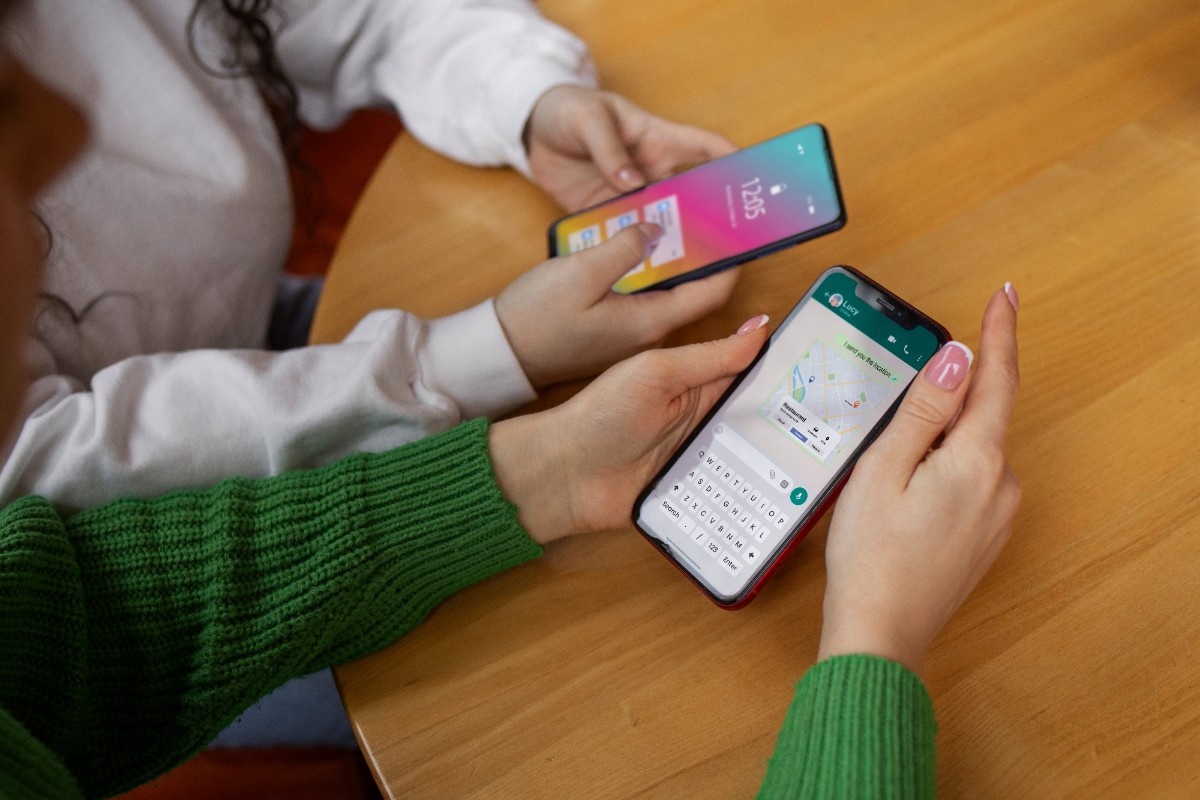
A customer visits a clinic website and clicks the WhatsApp button. A pre-filled message opens with the text “I’d like to book an appointment.” This triggers the automated flow.
The system sends a greeting that acknowledges the request and asks what type of appointment they need. The customer selects from a list: General Consultation, Follow-Up, Specialist Referral. They choose General Consultation.
The system checks availability in real time and presents the next available slots as a list. The customer picks Tuesday at 11am. The system asks for their full name and whether they are an existing patient or a new one. They answer both. The system checks their record in the CRM (or creates a new one), confirms the appointment with all details, and sends a calendar link.
Twenty-four hours before the appointment, an automated reminder lands in the same WhatsApp thread: “Your appointment is tomorrow at 11am. Reply YES to confirm or NO to reschedule.” The customer replies YES. The system updates the appointment status in the health management application software.
Two hours before, another message: “See you in two hours. Our address is [address]. Reply if you need to reach us.” The patient arrives. The appointment happens.
That entire sequence from initial contact to appointment completion ran without a single team member being involved in the coordination. Their time was freed for the consultation itself.
Where Businesses Are Seeing the Biggest Returns
WhatsApp appointment automation works across a wide range of service businesses, but the return on investment is particularly significant in sectors where appointment volume is high, no-show costs are measurable, and manual scheduling currently consumes substantial team time.
Healthcare and clinics. In India, 52 percent of private healthcare providers use WhatsApp for appointment reminders, discharge summaries, and follow-up care. Globally, WhatsApp automation is projected to contribute to $11 billion in administrative savings across healthcare and banking by 2026. For individual clinics and specialist practices, the benefit is immediate: fewer no-shows, less time spent on incoming appointment calls, and automated post-appointment follow-up that builds continuity of care.
Beauty, wellness, and personal services. Salons, barbershops, spas, and wellness centres typically operate with a small team where every unbooked slot represents a direct revenue loss. Automated WhatsApp booking handles the volume of appointment requests these businesses receive without requiring a dedicated receptionist. Reminders reduce the last-minute cancellations that leave gaps in the schedule with no time to fill them.
Real estate and property consultations. 74 percent of real estate agents identify WhatsApp as their primary channel for client communication. Automating property viewing bookings and consultation scheduling through WhatsApp removes the back-and-forth that currently delays these arrangements and lets agents focus their attention on qualified viewings rather than coordination logistics.
Financial services and insurance. Banks and financial advisors deal with high-value appointments where the cost of a no-show extends beyond lost time to a delayed sale or service interaction. Automated WhatsApp scheduling with firm confirmation sequences significantly reduces the drop-off between initial interest and completed consultation.
Hospitality. 65 percent of hospitality businesses in WhatsApp-dominant markets now use the channel for some form of guest communication. For restaurants, hotels, and experiences businesses, WhatsApp booking automation handles reservation enquiries, sends confirmation details, and delivers pre-arrival instructions without occupying front-of-house staff time.
The Role of No-Code Tools in Making This Accessible
A few years ago, building automated WhatsApp scheduling required custom API development work, which placed it out of reach for most small and mid-sized businesses. The emergence of no-code workflow platforms has changed that significantly.
Businesses can now configure complete WhatsApp appointment automation setups through visual builders that require no programming knowledge. The flows, triggers, conditions, and calendar integrations are assembled through drag-and-drop interfaces rather than written code. A salon owner, a clinic manager, or an operations lead can build and adjust these workflows themselves, without submitting a development request or waiting for technical resources.
This matters for businesses that want to iterate quickly. If a particular message in the booking flow generates frequent drop-offs, the team responsible for customer experience can adjust it the same day. If a new service type needs to be added to the booking menu, it takes minutes rather than a development sprint.
The accessibility of these tools is one of the reasons no-code workflow platforms for WhatsApp automation have seen such rapid adoption across businesses that previously assumed automation was only accessible to organisations with in-house technical capability.
Handling Reschedules and Cancellations Without Manual Work
Appointment automation that only handles the initial booking is only solving half the problem. A fully automated system also manages what happens when the customer needs to change or cancel.
When a reminder goes out and the customer replies that they cannot make their slot, the automation should immediately present rescheduling options from live calendar availability rather than routing the message to a team member to handle manually. The customer picks a new time, receives a new confirmation, and the original slot is released automatically.
Cancellations feed into a waitlist workflow if one is configured. A customer who was on the waitlist for that slot receives an automated WhatsApp message offering it. They can claim it with a single reply. The slot fills without a team member ever touching it.
This closed-loop approach to scheduling is what separates genuinely automated bdooking from partially automated booking. Many businesses automate the initial confirmation but still handle changes manually. The result is that their team’s time savings are partial, and the customer experience is inconsistent depending on how quickly the team responds to the change request.
Connecting WhatsApp Scheduling to Your CRM
The scheduling data your WhatsApp system generates is only as useful as the system it feeds into. When appointment bookings, confirmations, reschedules, cancellations, and no-show records flow automatically into your CRM, they build a contact history that improves every future interaction with that customer.
A customer who has rescheduled twice and no-showed once can be flagged for a different confirmation sequence: one that asks for explicit reconfirmation closer to the appointment time, or one that is accompanied by a deposit requirement. A customer who books consistently and never cancels can receive early access to sought-after slots as part of a loyalty approach.
The CRM integration also enables post-appointment follow-up sequences that are personalised to what actually happened. Rather than a generic satisfaction message, the follow-up can reference the specific appointment type, suggest a relevant next step, or offer a rebooking link at a time interval that makes sense for that service.
Understanding how WhatsApp CRM integration works in practice is essential for any business that wants to move beyond transactional scheduling toward a system that builds ongoing customer relationships rather than just managing individual bookings.
Keeping Customers Informed Between Bookings
The period between a booking being made and the appointment taking place is an opportunity that most businesses underuse. A customer who has booked a service has demonstrated intent and commitment. They are receptive to relevant communication during that window.
Automated WhatsApp sequences can deliver preparation instructions, directions, parking information, what to bring, how to prepare for the appointment, or what to expect during the service. These messages reduce anxiety for first-time customers, improve the quality of the appointment itself (a patient who has followed pre-appointment preparation instructions is more efficient to treat), and reduce the number of inbound queries from customers who are not sure what to do before they arrive.
Post-appointment sequences are equally valuable. A follow-up message asking how the experience went, offering a next booking link, or sharing relevant aftercare information keeps the relationship active and opens the door to repeat business without requiring any manual outreach from the team.
For businesses running multiple service types, these sequences can be tailored by what was booked. The post-appointment experience for a client who had a haircut is different from one who had a colour treatment, and the next-step suggestions should reflect that.
Smart Follow-Ups That Connect to Real-Time Data
The most effective appointment automation does not just fire messages on a schedule. It adjusts what it sends based on what the CRM knows about that customer at the moment the message goes out.
A customer who booked six months ago and has not been back since receives a reactivation message that acknowledges the gap and offers a simple rebooking link. A customer who has an appointment coming up in three days but has not yet confirmed it gets a more direct prompt than one who confirmed the moment the reminder landed. A customer who consistently books the same service type receives their appointment confirmation with information relevant to that service rather than a generic message.
This kind of contextual intelligence is what turns a scheduling tool into a smarter follow-up and CRM-connected workflow. The difference between a scheduled message and a contextual one is often the difference between a message that feels like service and one that feels like spam.
What a Complete Setup Looks Like
For a business setting up WhatsApp appointment automation from scratch, the implementation involves five distinct steps.
Step one: Connect to the WhatsApp Business API. This is done through a WhatsApp Business Solution Provider. The process involves verifying your business, setting up your WhatsApp business profile, and gaining API access. Reputable WhatsApp Automation Software platforms handle this process and provide the tools to build on top of the API connection once it is established.
Step two: Integrate your calendar or booking system. The automation needs live access to your availability. This integration connects your WhatsApp workflow to whichever scheduling tool your business uses, ensuring that the slots presented to customers in the booking flow reflect real-time availability.
Step three: Build the booking flow. Map out the conversation the customer will have with the automated system. Define the trigger, the information you need to collect, the format in which you present available slots, and the confirmation message the customer receives. Keep the flow as short as possible while still gathering everything the appointment requires.
Step four: Configure reminders and follow-up sequences. Set the timing, content, and response handling for your reminder messages. Define what happens if the customer confirms, what happens if they reschedule, and what happens if they do not respond.
Step five: Connect to your CRM and test end-to-end. Before going live, run the complete flow from initial trigger to post-appointment follow-up. Check that booking records appear correctly in your CRM, that calendar blocks are created and released accurately, and that all message sequences fire at the right times with the right content.
Common Mistakes That Reduce Effectiveness
Several patterns consistently reduce the performance of WhatsApp appointment automation setups, and they are worth knowing before you build.
Flows that ask for too much information. Every question the customer has to answer is a point of friction. Ask only what is genuinely necessary to book the appointment. Additional information can be collected through a separate intake form linked in the confirmation message.
Reminders sent too frequently or too far in advance. A reminder sent five days before an appointment is forgotten by the time the appointment arrives. A reminder sent the morning of the appointment gives the customer enough time to reschedule if needed but not enough notice to leave your slot unfillable. Find the right interval for your service type and stick to it.
No rescheduling option in the reminder message. If your reminder does not give the customer an easy way to reschedule, you will get more no-shows from people who know they cannot make it but have no clear path to changing their booking. Always include a reschedule prompt alongside the confirmation request.
Disconnected from actual calendar availability. An automation that presents slots from a static list rather than a live calendar will eventually double-book or offer times that are no longer available. The integration between your WhatsApp flow and your live scheduling system is non-negotiable for a setup that runs reliably.
The Bigger Picture: Scheduling as Part of a Broader Automation Strategy
Appointment automation is a natural starting point for WhatsApp automation because the use case is concrete, the ROI is measurable, and the customer experience improvement is immediate. But it is also a foundation for a broader communication strategy that extends well beyond the booking flow.
Once your WhatsApp infrastructure is in place and your team has seen how automation handles scheduling without manual intervention, the same logic extends to lead qualification, post-purchase sequences, customer support routing, reactivation campaigns, and loyalty communications. Each of these builds on the same underlying platform and workflow architecture.
For businesses in e-commerce, the connection between scheduling automation and broader customer communication strategy is particularly valuable. The complete guide to WhatsApp automation for e-commerce covers how businesses operating online stores extend these principles across the full purchase lifecycle, from initial enquiry through to repeat purchase and retention.
The businesses getting the most from WhatsApp are the ones that recognised early that it is not a customer service channel or a marketing channel or a booking channel. It is a communication infrastructure that serves all of those purposes simultaneously, and the return on building it properly compounds over time.
No-show rates drop. Rebooking rates rise. Team time shifts from coordination to delivery. And customer relationships deepen because the communication they receive is timely, relevant, and consistent regardless of which team member might have handled it manually on any given day.
That is the operational case for WhatsApp appointment automation. Not as a feature to implement, but as a foundation to build on.
Getting Started
If you are evaluating whether WhatsApp appointment automation is the right next step for your business, the most useful starting point is mapping your current booking process from first contact to confirmed appointment. Count the number of touchpoints that require manual action. Estimate the time each one consumes per week. Then consider what your team could do with that time if the system handled coordination automatically.
Most businesses find that the operational case becomes obvious quickly. The question then shifts from whether to automate to how to build a system that works reliably for the specific way your business operates.
WhatsApp Automation Software built for service businesses handles the full scope of this: API access, workflow building, calendar integration, CRM sync, reminder sequences, and the analytics layer that tells you how your booking system is performing over time.
For businesses exploring the full range of what WhatsApp automation can do beyond scheduling, understanding why businesses are making the switch to no-code WhatsApp automation platforms gives useful context on how the tools available today compare to what was possible even two years ago, and what has changed about the accessibility of building these systems without a technical team.
The infrastructure is ready. The customer behaviour is already there. The question is whether your booking process is keeping up.